How to improve your business’s visibility in local searches and on Google Maps
Imagine a tourist arriving in Santa Maria on the island of Sal and deciding to look for a restaurant for dinner. They are unfamiliar with the town’s establishments, have no recommendations from friends and would prefer to find out what options are available before leaving the hotel.
Pick up your mobile and type into Google: ‘restaurants near me’.
Within seconds, a range of establishments appear, complete with photographs, reviews, opening hours and location details. The visitor compares a few options and chooses one of them.
Now imagine that your restaurant is located right in that area, serves good food and has competitive prices. But it doesn’t appear amongst the results that the tourist has looked up.
The problem isn’t necessarily the quality of your business. It may be the difficulty potential customers have in finding you.
This situation can apply to restaurants, accommodation providers, shops, tour operators and many other service providers in Cabo Verde.
Google has become a gateway for local businesses
When someone searches for a product or service in a particular location, Google may display results associated with nearby businesses or those relevant to that search.
This is what happens when we search for phrases such as:
- Seafood restaurant in Santa Maria
- Bicycle hire on the island of Sal
- Beauty salon near me
- Excursions in Cabo Verde
- Souvenir shop in Santa Maria
These searches have one important characteristic: often, the person isn’t just looking for information. They are considering a purchase, a visit or hiring a service.
For this reason, appearing in local search results with useful information can represent a business opportunity.
It’s not about appearing in every possible search result. The aim is to be found by people who are looking for exactly what your business offers.
Why do some businesses appear and others don’t?
Google’s local search results are not displayed at random.
According to the official Google Business Profile documentation, local rankings are primarily based on three factors: relevance, distance and reputation.
Relevance: does the business match the search query?
Relevance relates to the match between what a person is looking for and the information available about a business.
If someone is looking for a restaurant serving Cape Verdean food, Google tries to identify businesses offering that type of service.
A business listing with the correct category, a clear description and comprehensive information helps the system to better understand the business’s activities.
Distance: where is the client based?
Location also influences the results.
A tourist looking for a pastry shop whilst strolling through the centre of Santa Maria may find different options to those shown to someone searching from another part of the island.
This factor depends on the location used in the search and cannot be directly controlled by the business owner.
Brand awareness: is the business well known?
Visibility is linked to the recognition of a business, both in the physical and digital worlds.
Google takes various factors into account, including information available online, business references and reviews.
This does not mean that the establishment with the most reviews always appears first. Ranking depends on a combination of various factors.
Having an online presence isn’t just about having a name on Google. It means providing enough information for a potential customer to find, understand and consider your business.
An incomplete company profile can raise questions
Imagine two small restaurants situated on the same street.
The homepage displays up-to-date opening hours, recent photographs, the correct location, a telephone number and customer reviews.
The second one features only the name and an old photograph. It does not clearly state the opening hours and the telephone number is out of date.
Which of these provides the most information to help a visitor decide where to have dinner?
The answer seems obvious, although this does not guarantee that the first restaurant will be chosen.
A comprehensive digital presence reduces uncertainty and makes decision-making easier.
For a foreign visitor, who may be completely unfamiliar with local establishments, this information is particularly useful.
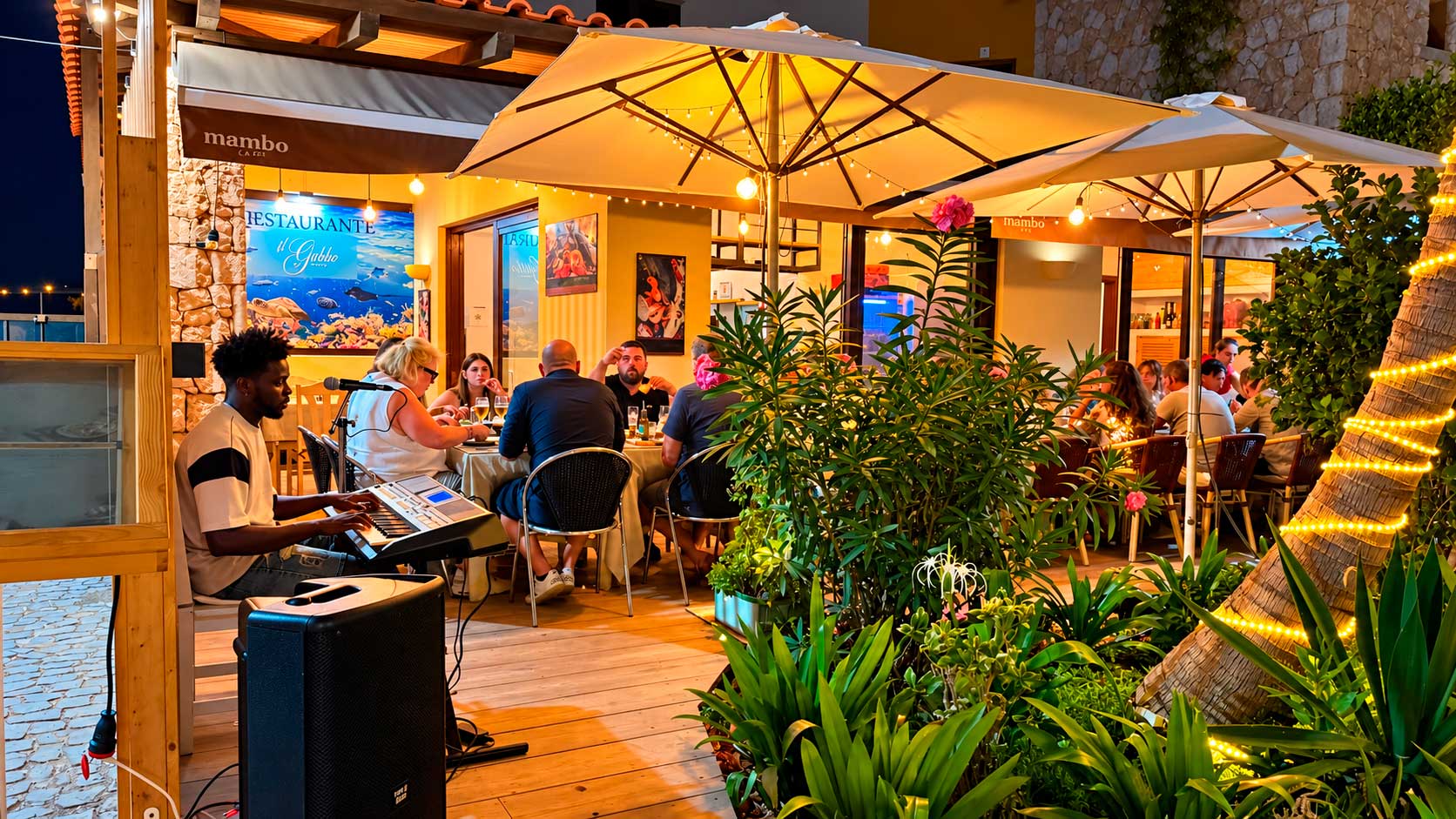
The photographs show what words cannot always explain
A restaurant might claim to have a welcoming atmosphere. An accommodation provider might describe its rooms as comfortable. A tour operator might promise memorable experiences.
However, a photograph allows visitors to see specific details before making a decision.
In the case of a restaurant, it can showcase the venue, the dishes and the table settings. For accommodation, it allows visitors to view the rooms and communal areas. For a shop, it helps customers identify the products available.
Google recommends using clear, well-lit photographs that accurately reflect the reality of the establishment.
It is preferable to present authentic, carefully chosen images of the business itself rather than using generic photographs that do not reflect what the customer will actually find.
It is also important to keep images up to date. A photograph taken several years ago may no longer accurately represent a space that has since been renovated or altered.
Photography shouldn’t just make a business look better. It should help customers get to know it.
Customer reviews form part of the digital reputation
Before visiting a venue, many people check reviews posted by other customers.
Reviews may mention the quality of the food, the friendliness of the staff, cleanliness, punctuality or the value for money.
These examples do not constitute a guarantee of quality, but they provide information that potential clients may wish to consider.
For business owners, they also represent a learning opportunity.
Respond to positive comments
Thanking a customer for a review demonstrates attention and appreciation for their experience.
A simple, polite and personalised reply is generally more appropriate than an automated message repeated in every comment.
How should you deal with a negative review?
Receiving criticism can be unpleasant, especially when the business owner feels that the situation has been unfairly portrayed.
However, responding aggressively rarely helps to convey a professional image.
A more constructive approach involves acknowledging the concern raised, clarifying the facts where necessary and seeking an appropriate solution.
It is also important to avoid publishing clients’ private information.
It is not just the person who left the review who reads a response; it is also potential customers who may consult it in the future.
The problem of out-of-date information
A business may change its opening hours, add new services, update its telephone number or close temporarily.
When these changes are not reflected on digital platforms, awkward situations can arise.
One tourist might turn up at a shop only to find it’s closed. Another might try calling a number that no longer works.
These minor issues can detract from the customer experience and undermine confidence in the information published.
For this reason, maintaining a digital presence should be seen as an ongoing task, rather than simply an activity carried out when the business first opens.
It’s not enough just to be visible: you need to communicate effectively
Tourism on the island of Sal attracts visitors of different nationalities, languages and spending habits.
According to the National Institute of Statistics of Cabo Verde, non-residents accounted for 95.5 per cent of guest stays in the country’s hotels in 2025.
The United Kingdom stood out as the main source market, followed by Portugal and other European countries.
This context highlights the importance of providing information that international visitors can understand.
A restaurant can benefit from an English-language menu. A car hire company can explain its terms and conditions in different languages. An accommodation provider can provide clear instructions on bookings and opening hours.
It is not essential to translate all content into multiple languages. However, it is worth identifying which information is essential for regular customers.
A customer doesn’t need to know all the details of your business before visiting your website. They need to find clear answers to the questions that help them make a decision.
The website and Google Maps should complement each other
A listing on Google Maps can serve as a point of discovery. However, it does not always provide enough space to explain a company’s products and services in detail.
This is where a website can play a complementary role.
A restaurant can use its page to showcase its full menu. A tour operator can display the available itineraries, the duration of activities and booking conditions.
A guesthouse can outline the services included, provide photographs of the rooms and make it easy to get in touch directly.
The aim is not to duplicate information unnecessarily, but to create a coherent experience.
Customers should find consistent information, regardless of whether they arrive via Google, social media or the website.

Seven simple checks you can carry out today
Even without technical knowledge, any business owner can carry out an initial assessment of their establishment’s digital presence.
1. Search for your business name
Open Google and search for the business name. Check whether the establishment appears and whether the information displayed is correct.
2. Confirm the location
Please check that the Google Maps marker corresponds to the entrance or actual location of the establishment.
3. Check opening hours
Please check opening days, special opening hours and any temporary closures.
4. Analyse the photographs
Please review the available images and identify which ones need updating or replacing.
5. Read the latest reviews
Look out for comments that may reveal opportunities for improvement in customer service or the services provided.
6. Try searching for related services
If you own a restaurant, search for restaurants in your area. If you run a tour business, look for the activities you offer.
Please note that results may vary depending on location, device and other factors. A single search is not sufficient to determine a business’s usual ranking.
7. Check the mobile experience
Check that the website, contact details and key information are easy to view on a small screen.
These checks do not constitute a full audit, but they may reveal issues that have gone unnoticed for months.
Digital visibility is built through consistency
Improving a business’s presence on Google is not a task that ends once a business listing has been completed.
Information changes, customers post new reviews, competitors emerge and services may evolve.
That’s why the most useful work usually involves small, regular tasks: updating content, reviewing photographs, checking contact details and keeping track of what customers are looking for.
It is also important to maintain realistic expectations. There is no proven formula that guarantees the top spot on Google Maps.
Google itself makes it clear that it is not possible to request or pay for a higher organic local ranking.
For businesses in Santa Maria and other locations in Cabo Verde, the priority should be to provide useful and accurate information, make it easy to get in touch, and build a reputation based on the quality of service.
The ultimate goal is not simply to appear on a map.
It’s about ensuring the right people discover your business, understand what you offer and have reasons to choose you.
Have you checked how your business appears on Google Maps?
Minor issues with information, photographs or visibility may go unnoticed. Discover NetStudio’s free digital tools and find out how to start analysing your business’s online presence.
Sources and references
- Google Business Profile — Improving rankings in local search results
- Google Business Profile — Manage photos and videos
- National Institute of Statistics — Guest Traffic 2025
Information and references consulted in October 2026.
read next

Are the photographs of your business attracting or putting customers off?

7 signs that your company’s website needs improving